Browse by platform
Find the MT5 EA or cTrader cBot edition, review its setup notes and open the correct official marketplace.
Explore the product catalogue → Products

Gold automation for MT5 and cTrader
Gold trading software for MetaTrader 5 and cTrader. Review the platform editions, manuals and testing evidence before choosing a product to test.
Free Lock30x MT5 tutorial · Plan a demo test · Review testing evidence
Automated trading can lose money. Historical results do not guarantee future performance.
Start here
Compare the products for your platform, plan a repeatable test, or work through a backtest that will not trade.
Find the MT5 EA or cTrader cBot edition, review its setup notes and open the correct official marketplace.
Explore the product catalogue →Record your broker, symbol, build, preset, dates and costs before running a test.
Open tools and testing guides →Check the package, settings, historical data and logs with the MT5 and cTrader troubleshooting guides.
Open backtest troubleshooting →New on MQL5 Market · MetaTrader 5
A multi-symbol cryptocurrency Expert Advisor for MT5 that can coordinate a configurable basket from one H1 chart. Citadel combines three independently owned engines with basket-level quote, margin and drawdown monitoring.
The video is a historical backtesting demonstration. It is not live trading evidence and does not guarantee future performance.
MT5 EA + cTrader cBot · Official marketplace links
Gold automation for MT5 and cTrader, with platform-specific builds, independently managed strategy engines and portfolio controls. Review the current listing and documentation for your platform before testing.
The official cTrader listing is available. The video shows a historical build; compare its version with the current Store listing. Historical simulations do not guarantee future or live performance.
Now available on cTrader Store · MT5 edition also available
Explore ECFX XAU Dual Crown for cTrader and MetaTrader 5. The XAUUSD M5 cBot is now available through the official cTrader Store. Watch the cTrader visual backtest and choose the edition that matches your trading platform.
Backtests are historical simulations and do not guarantee future or live performance.
 AurumTwelve12 • XAU Portfolio cBot
Now available on cTrader Store
A twelve-strategy, multi-timeframe XAU portfolio robot for cTrader and MT5. Open the official cTrader listing, watch the visual backtest, or inspect the complete FxPro and IC Markets histories alongside the FTMO MT5 tester report.

Visual backtest
The video shows the cTrader backtest workflow and the twelve-strategy portfolio in action. Historical simulations are not a guarantee of future performance.


MetaTrader 5
An independent MetaTrader 5 Expert Advisor for XAUUSD M5 built for directional continuation setups with broker-time filtering, built-in risk controls and two concurrent position engines. This is an MT5-only product in the ExpertCodeFX catalogue.
Backtests are historical simulations and do not guarantee future results.
New cTrader cBot · Available on cTrader Store
Gold Sprint Prop is a XAUUSD M5 cBot built around scored breakout, pullback and impulse setups, with EMA, RSI and ATR inputs plus configurable position sizing and risk controls. Watch the visual backtest, then review the product notes before considering it for your own broker conditions.
Gold Sprint Prop is now live in the official cTrader Store. Historical simulations do not guarantee future or live performance.
cTrader · XAUUSD M5
Watch the historical R13 walkthrough, then follow the separate $10,000 FTMO server demo record. The demo includes earlier builds and handovers; it does not isolate the current R13 HF1 build's performance.
Demo and simulated results do not guarantee future returns or passing a prop-firm challenge.
Featured products
One XAUUSD-focused trading system, packaged for two platforms: Lock30x XAUUSD for MetaTrader 5 users and LOCK30x XAU M5 cBOT for cTrader users.
The MetaTrader 5 edition is available through the official MQL5 Market listing for buyers who want MQL5 licensing, installation, and updates.
The cTrader edition brings the Lock30x gold workflow into cTrader with its own dashboard, visual tester screenshots, and cTrader Store listing.
Both versions are built around XAUUSD-style gold symbols, broker differences, spread checks, session behaviour, and responsible testing.
MetaTrader 5
Use this path if you trade through MetaTrader 5 and want the EA delivered through MQL5 Market licensing.
cTrader Store
The cTrader edition is a separate XAUUSD M5 cBot with four configurable engines, account monitoring and broker-specific setup checks.
MT5 demo trade history
This 48-second screen recording walks through the MT5 trade history from a BlackBull Markets demo account. The privacy-safe full PDF report—with the complete history, costs, balance curve and result summary—is published on the Lock30x product page.
Demo and historical results are not live performance and do not guarantee future results.
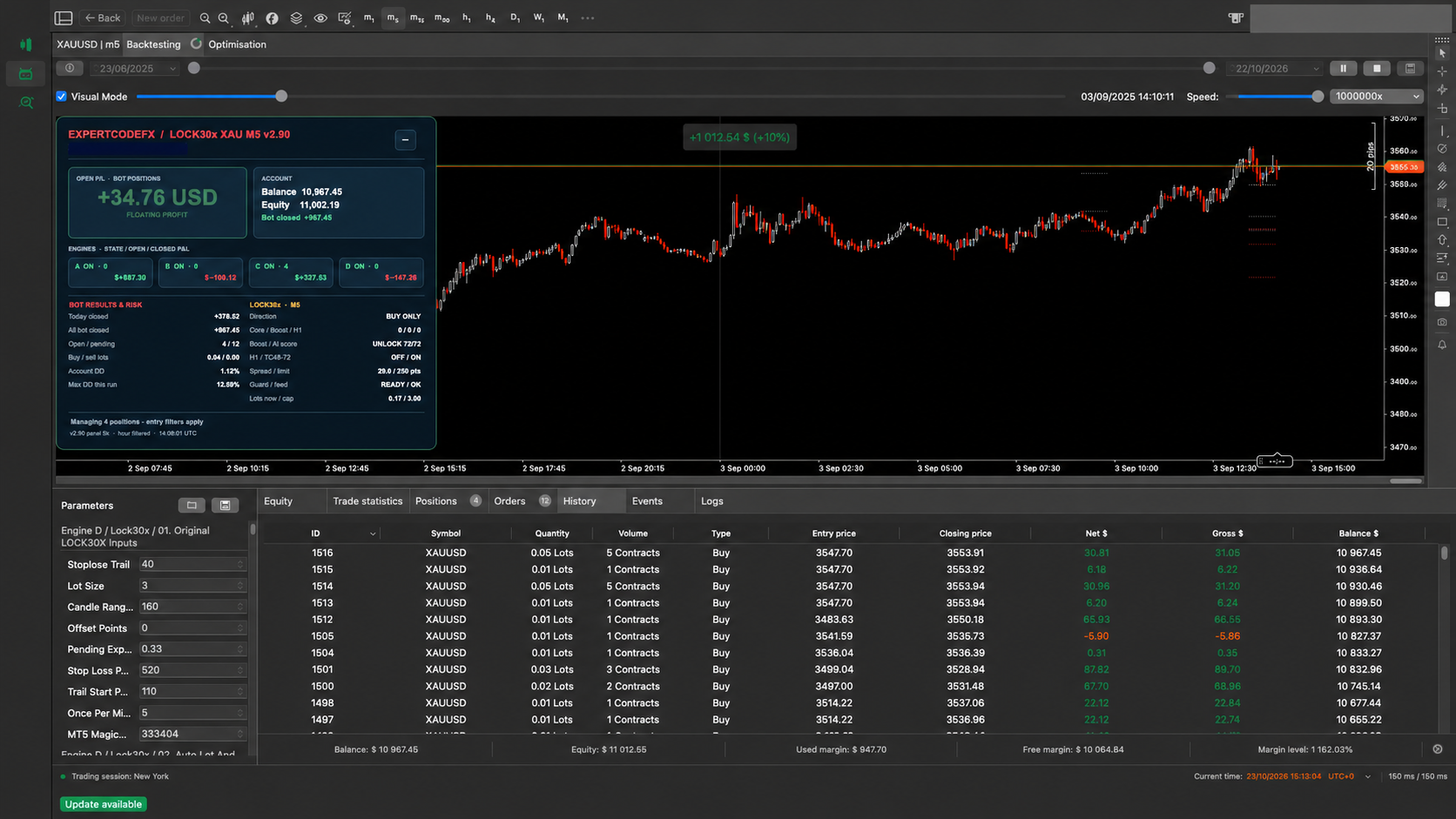
cTrader panel reference · v2.90
The supplied v2.90 interface shows open bot P/L, account balance and equity, engines A–D, bot results and risk, spread, guard and entry status. Match the panel version shown inside your installed cBot to its Store release and settings.
How to approach it
Use MQL5 if you want the MetaTrader 5 EA, or cTrader Store if your trading account is inside cTrader.
Attach the bot to your broker's gold symbol, such as XAUUSD, XAUUSD.P, XAUUSD.a, XAUUSDm, or GOLD.
Run backtests using your own broker data, spread, commission, leverage, and server time. Compare long-term results against the most recent section.
Forward-test on demo or low-risk conditions before considering any live account exposure, especially around gold news and high-spread periods.
Official purchase paths
ExpertCodeFX does not take checkout details on this website. Buyers complete purchase, licensing, updates, and marketplace account management through MQL5 or cTrader Store.
More from cTrader Store
Browse cTrader Store collections that may complement your own research, or learn how to publish trading tools as a cTrader seller.
Explore automated trading systems from independent cTrader Store developers across a range of markets and approaches.
Explore cTrader botsOpen cTrader Store's curated collection of gold-focused cBots and tools for further comparison and independent review.
View XAUUSD toolsHave your own cBot, indicator or plugin? Review cTrader Store's seller onboarding path and publishing information.
Explore seller onboardingAffiliate disclosure: The links in this section are affiliate links. If you make an eligible purchase or join as a seller through them, ExpertCodeFX may earn a commission at no extra cost to you. Listings are provided by independent sellers; inclusion here is not a performance endorsement, and trading results are never guaranteed.
Broker referral partner
IC Trading is an external broker service. If you choose to explore its offering, use the official link below and assess whether its services, jurisdiction, product terms and risks are suitable for you.

Open IC Trading’s website to review its current account, platform and legal information directly.
See the IC Trading + ECFX testing guide Visit IC Trading
Review current program terms and the responsible ECFX software-testing workflow before making any decision.
Open the Funded Trading Plus guideAffiliate disclosure and risk warning: ExpertCodeFX may earn a commission if you become an eligible IC Trading client through this link, at no extra cost to you. ExpertCodeFX is an independent software provider, not a broker; we do not accept deposits, hold client money, execute trades, or provide personal financial advice. CFDs are complex instruments and can result in rapid losses due to leverage. Consider the broker’s official legal documents and risk disclosure, and seek independent advice where appropriate.
Custom MT5 development
Send ExpertCodeFX your platform, market, timeframe and exact trading rules for a free, no-obligation feasibility review. We’ll identify what can be automated, what still needs clarification and provide a written scope with a fixed quote.
The free review is technical, not a profit promise. We can build software from defined rules, but we do not invent guaranteed strategies or manufacture performance claims.
Approved projects also include 30 days of bug-fix support for the agreed written specification. Simple MT5 automation projects start from $199; complex work is quoted after review.
We review the rules, identify missing decisions and explain the likely technical approach before you commit to a build.
For one clearly defined MT5 strategy with agreed entries, exits, risk rules and a practical set of configurable inputs.
For advanced execution, multiple engines, portfolio controls, statistics panels, documentation or broader testing requirements.
Debugging legitimately owned MQ5 source, trade-management utilities, indicator automation and systematic optimization research.
What the free review covers
What it does not include
Important: Custom software development does not include financial advice or a promise that a strategy will be profitable. Historical, simulated and forward-test results can differ from future live performance because of market conditions, broker pricing, spreads, commission, slippage, leverage, platform configuration and data quality.
Risk notice
Expert Advisors can lose money. Backtests are not guarantees. Broker spread, execution speed, slippage, commission, swaps, symbol specification, VPS reliability, market news, and historical data quality can materially change results. Use any EA only after independent testing and with risk you can afford to lose.
Official channels
Use these official ExpertCodeFX channels for new EA and cBot videos, development updates, backtests and business enquiries.
Common questions
No. This site is the official product hub and sends buyers to the correct store: MQL5 for the MT5 EA, or cTrader Store for the cBot.
No. No automated strategy can guarantee profit or prop-firm success. The correct workflow is backtest, demo test, review drawdown, then decide whether the risk fits your account.
Lock30x is positioned for XAUUSD/gold trading. Broker symbol names may include suffixes such as XAUUSD.P, XAUUSD.a, XAUUSDm, or GOLD, so always confirm the exact chart symbol.
No. The review checks whether clearly defined rules can be automated, identifies missing decisions and provides a proposed scope and quote. Development begins only after the written specification, price and delivery terms are agreed.
Only when you provide legitimate editable source code and confirm that you own it or have permission to modify it. We do not decompile protected EX4 or EX5 products or reproduce another developer's work without authorisation.
Use the official store links for product access, licensing, updates, and buyer protection.